
MainWP Maintenance Extension
Clear revisions, comments and transients from your child site databases on demand or on a schedule.



Clean and optimize the databases of all your child sites from your MainWP Dashboard
The MainWP Maintenance Extension is a Pro MainWP add-on that cleans and optimizes your child site databases without logging in to each site, removing revisions, drafts, trash content, comments, empty taxonomies and transients. You run the cleanup from your MainWP Dashboard on demand or on a schedule, for the sites, tags or clients you pick.
What the MainWP Maintenance Extension replaces
Without the extension, database cleanup means logging in to each site separately to clear out old revisions, spam and stale transients and to optimize its tables. With the MainWP Maintenance Extension, you choose the cleanup tasks once, run them on a group of sites, and set schedules that repeat the work for you.
MainWP Maintenance Extension features
| Feature | What it means for you |
|---|---|
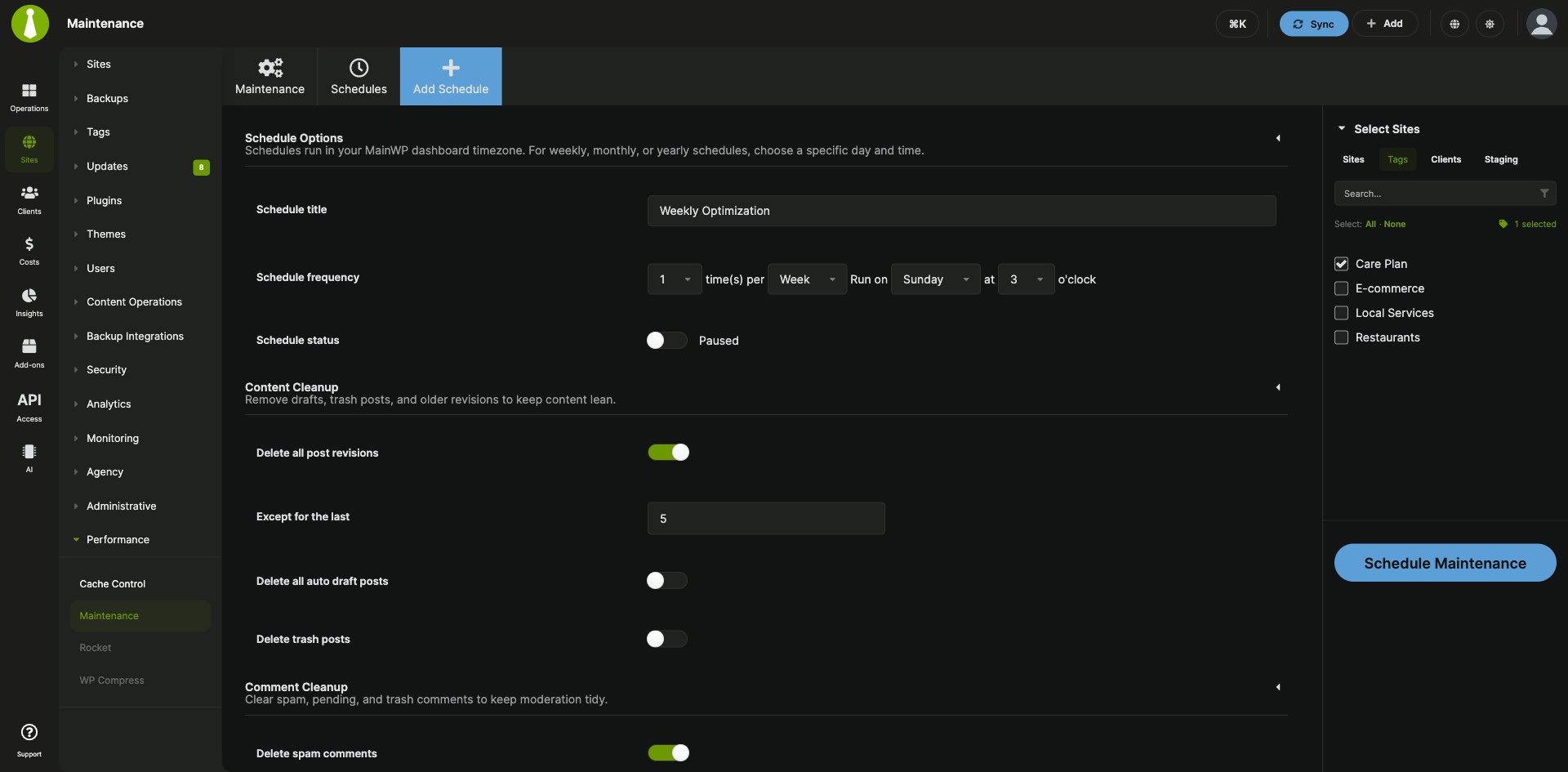
| Content cleanup | Delete post revisions, auto draft posts and trash posts. Set Except for the last to keep the newest revisions. |
| Comment and taxonomy cleanup | Delete spam, pending and trash comments, and remove tags and categories that have no posts. |
| Transient cleanup | Choose to leave transients alone, delete only expired transients, or delete all transients. |
| Database optimization | Optimize the database tables of your child sites in the same run. |
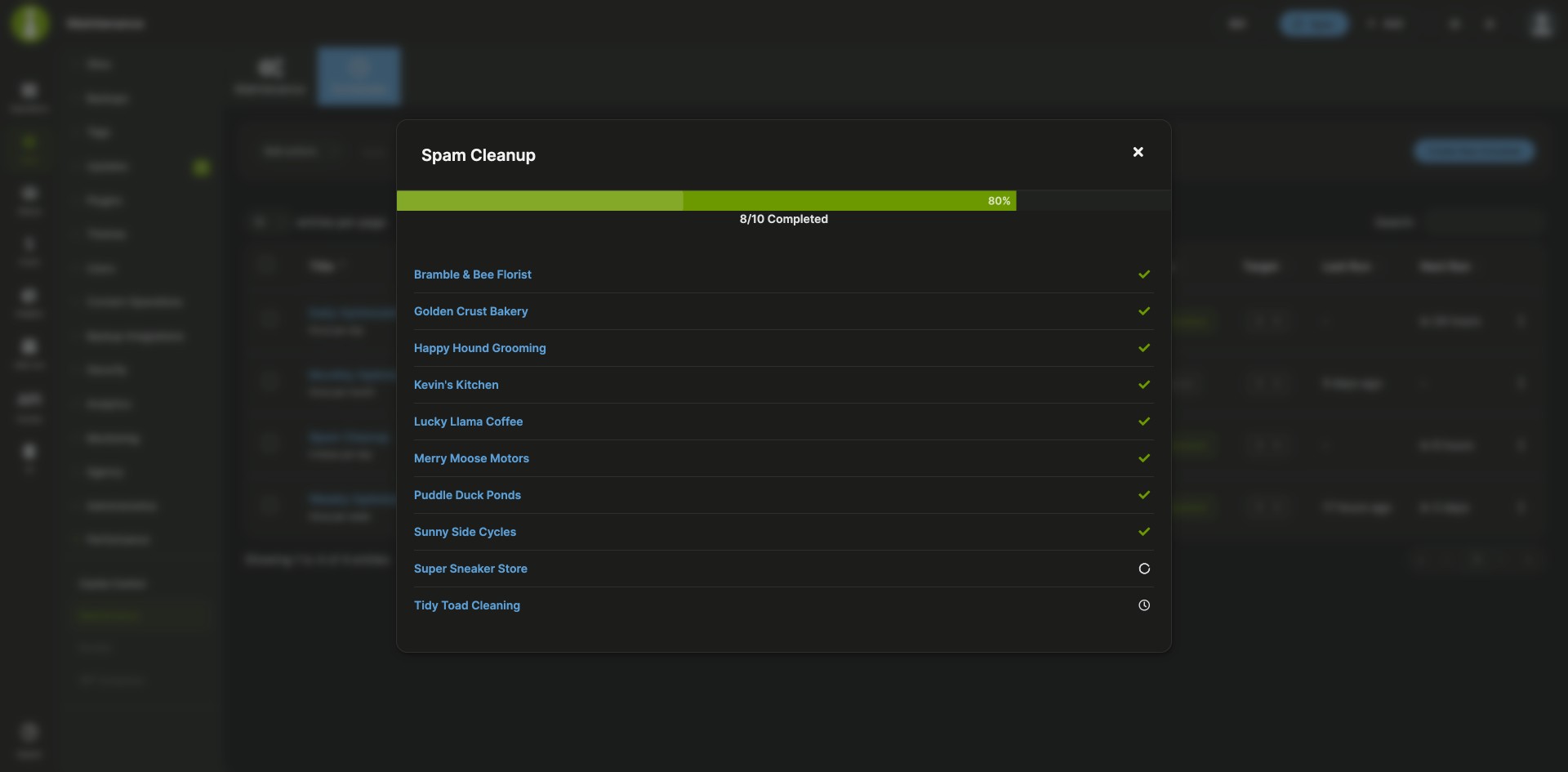
| Targets by site, tag or client | Pick the child sites for a run or a schedule in the Select Sites accordion by Sites, Tags or Clients. A progress window shows the tasks as they run on each site. |
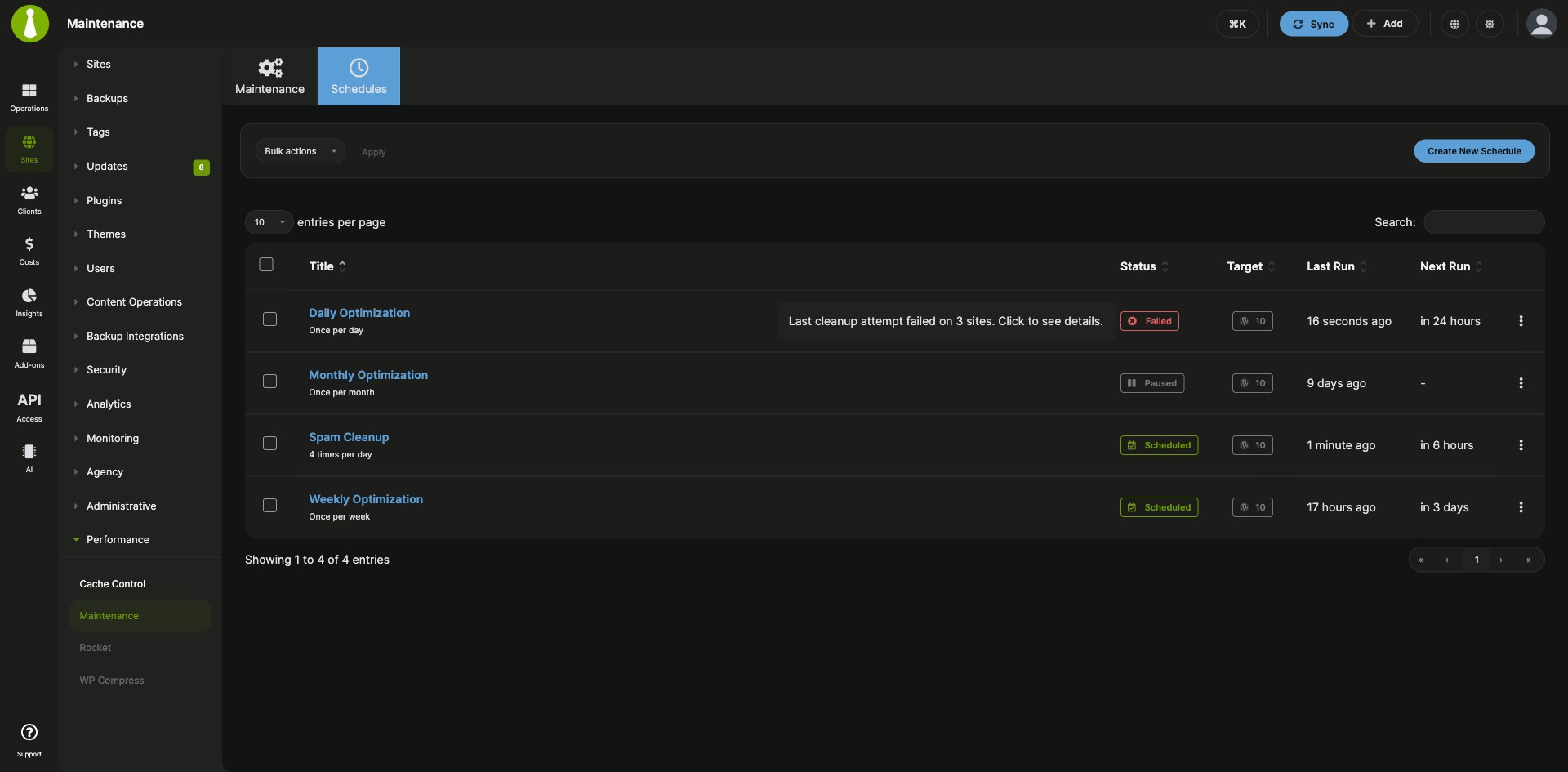
| Recurring schedules | Save the cleanup as a schedule with its own frequency, run day and hour. Run a schedule now, pause and resume it, or pause, resume and delete several schedules at once with bulk actions. |
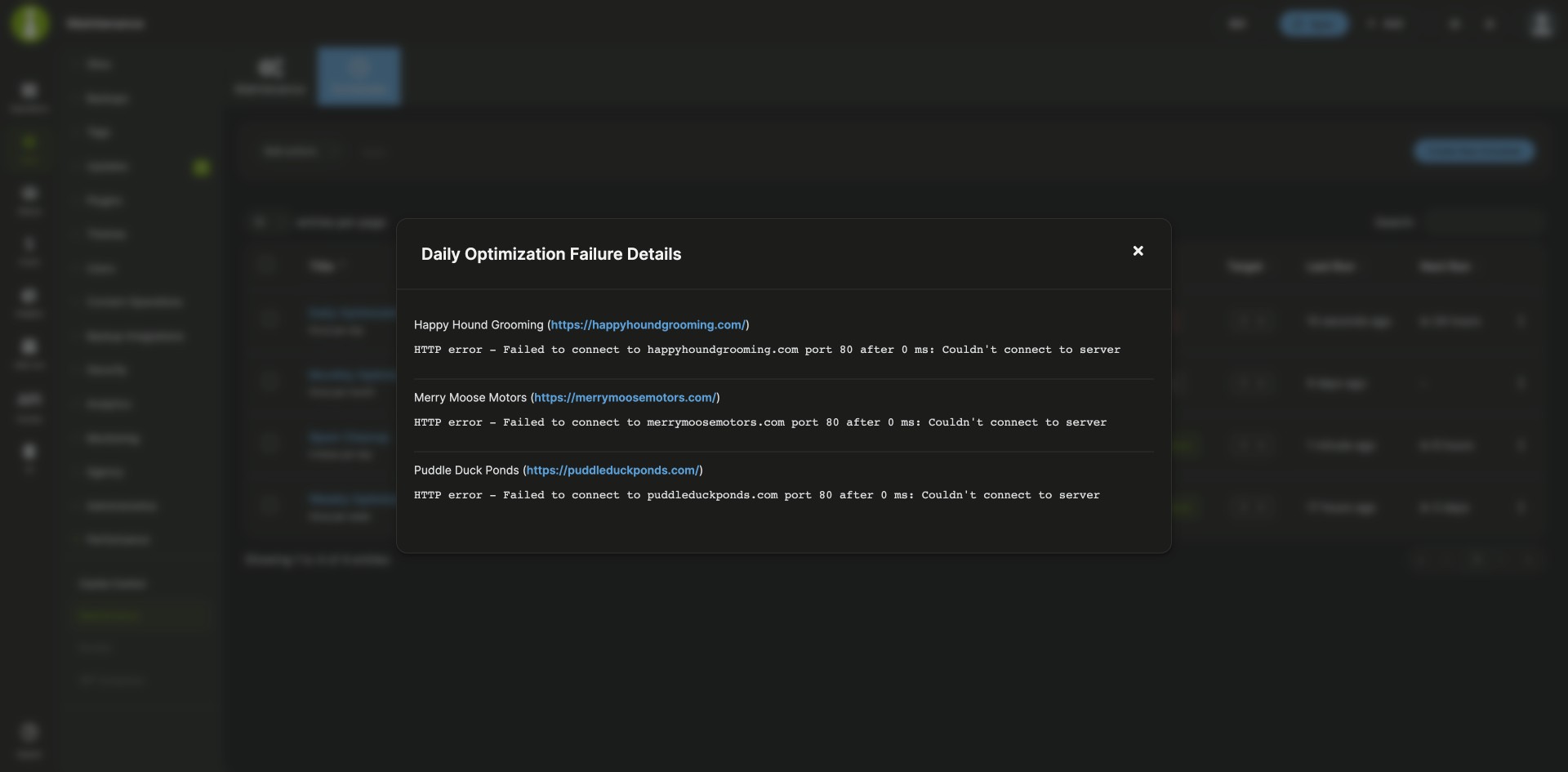
| Schedule status and failure details | The Schedules table shows each schedule’s status, target count, last run and next run. When a run fails on a child site, click the Failed label to see the site name, URL and recorded error. |
| Maintenance data in Pro Reports | Show completed maintenance in client reports with [section.maintenance.process], [maintenance.process.date], [maintenance.process.details], [maintenance.process.result] and [maintenance.process.count]. |
MainWP Maintenance Extension requirements
| Item | Requirement |
|---|---|
| License | MainWP Pro (included in the Pro Bundle) |
| MainWP Dashboard | The MainWP Maintenance Extension installed and activated. No third-party plugins are needed. |
| Child sites | Connected MainWP Child sites |
| Backups | A recent database backup for each site you plan to maintain |
| Pro Reports (optional) | The MainWP Pro Reports Extension, to add maintenance results to client reports |
How to set up the MainWP Maintenance Extension
Run maintenance now
- Go to MainWP > Add-ons > Performance > Maintenance and stay on the Maintenance tab.
- Select the cleanup tasks. If you turn on Delete all post revisions, set Except for the last to the number of revisions to keep.
- In Transient Cleanup, choose to skip transients, delete expired transients, or delete all transients.
- In the Select Sites accordion, choose your targets by Sites, Tags or Clients.
- Click Run Maintenance and confirm any warnings for database optimization or deleting all transients.
Schedule maintenance
- Go to MainWP > Add-ons > Performance > Maintenance > Schedules and click Create New Schedule.
- Enter a Schedule title and choose the Schedule frequency. For weekly, monthly and yearly schedules that run once per period, choose the run day and hour in Schedule Options.
- Leave Paused off so the schedule runs automatically.
- Choose the cleanup tasks, revision retention value and transient cleanup mode, then pick the targets in the Select Sites accordion.
- Click Schedule Maintenance.
Full instructions for cleanup options, schedule statuses, row actions and bulk actions: Maintenance documentation.
How the MainWP Maintenance Extension works
You set up maintenance in your MainWP Dashboard, and the selected tasks run on each child site you target. Schedules use your MainWP Dashboard timezone and are triggered by WP-Cron. Database optimization and deleting all transients can slow a site down for a short time while its cached data is rebuilt.
MainWP Maintenance Extension FAQ
Can I schedule database cleanup to run automatically?
You can schedule database cleanup by creating a schedule under MainWP > Add-ons > Performance > Maintenance > Schedules, choosing its frequency, tasks and target sites, and leaving Paused off. You can pause, resume, edit, delete or run any schedule from its row menu in the Schedules table.
Can I keep the most recent post revisions?
You can keep the newest post revisions with the Except for the last setting. When you turn on Delete all post revisions, set it to the number of revisions to keep on each post. Enter 0 to delete all revisions.
How do I find out why a scheduled maintenance run failed?
Click the Failed status label in the Schedules table to open the failure details. MainWP stores the name, URL and recorded error for each child site where the run failed, when that information is available.
Should I back up my sites before running maintenance?
Create a database backup of each site before you run maintenance, because the cleanup tasks delete data from the child site databases.
Do I need to install anything on my child sites?
You don’t need another plugin on your child sites. They only need to be connected to your MainWP Dashboard through MainWP Child.
What do I need to pay for?
The MainWP Maintenance Extension is part of MainWP Pro and is included in the Pro Bundle. It needs no third-party plugins. To add maintenance results to client reports, you also need the MainWP Pro Reports Extension, which is a Pro add-on in the Pro Bundle too.
Where do I get support?
MainWP develops the Maintenance Extension, so MainWP support handles questions and issues with it.